稀有猿诉

十年磨一剑,历炼出锋芒,说话千百句,不如码二行。

在Compose中用Shader实现透明的粘稠元球效果

本文译自「Compose AGSL Shader: Gooey Outline Metaball Effect with Transparent Background」,原文链接https://medium.com/@yuriyskul/compose-agsl-shader-gooey-outline-metaball-effect-with-transparent-background-cb8b0e72286c,由Yuriy Skul发布于2024年12月2日。

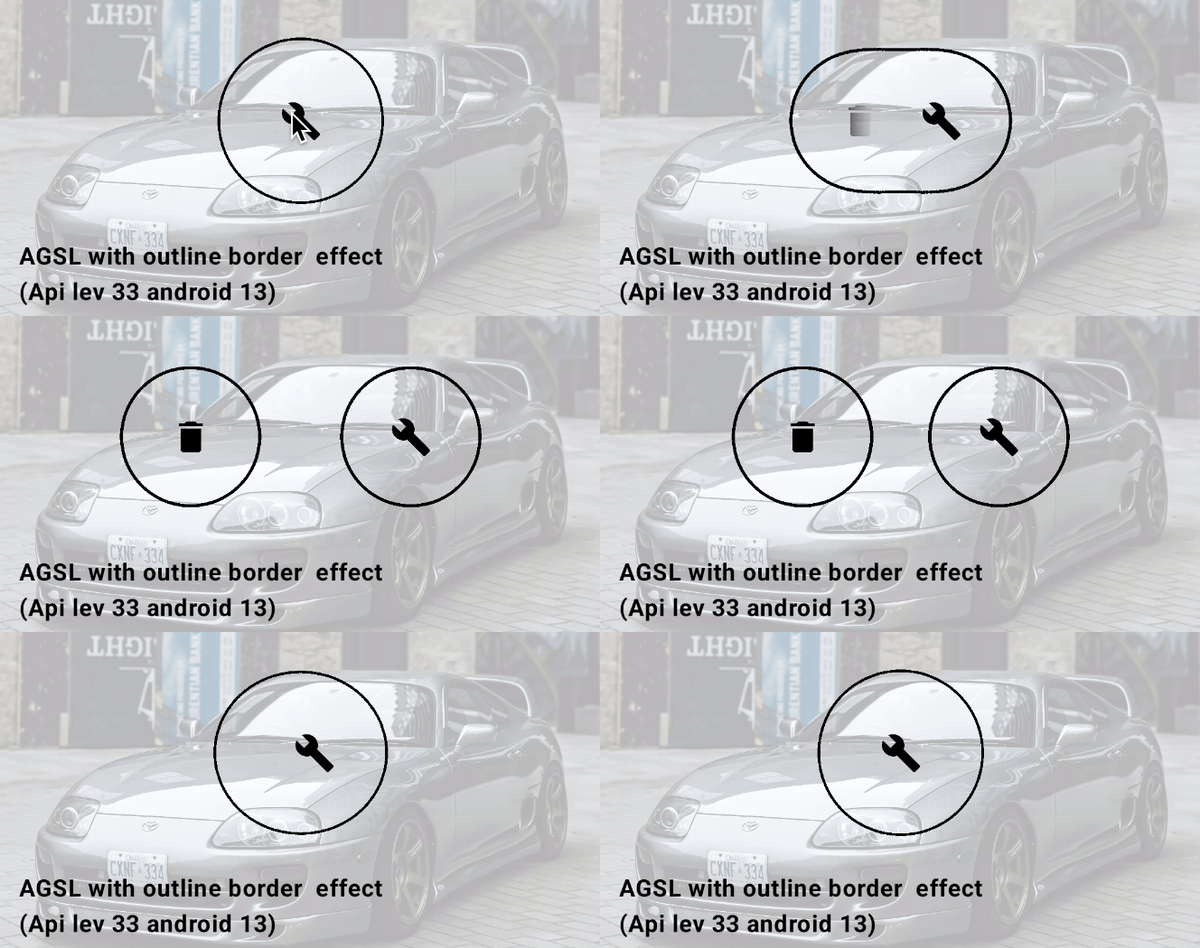
本文探讨如何通过两个圆形之间的简单交互创建元球效果元球形状带有边框,而背景保持完全透明,从而确保底层内容的可见性。元球内部的图标也保持可见。此效果是通过对整个容器应用高级AGSL 着色器,并结合对每个交互元素应用模糊效果来实现的。

创建带有轮廓效果的透明边框元球背景的概念可以参考这篇文章:在 Jetpack Compose 中使用模糊和 AGSL 运行时渲染效果链创建带有轮廓描边边框的透明元球背景。

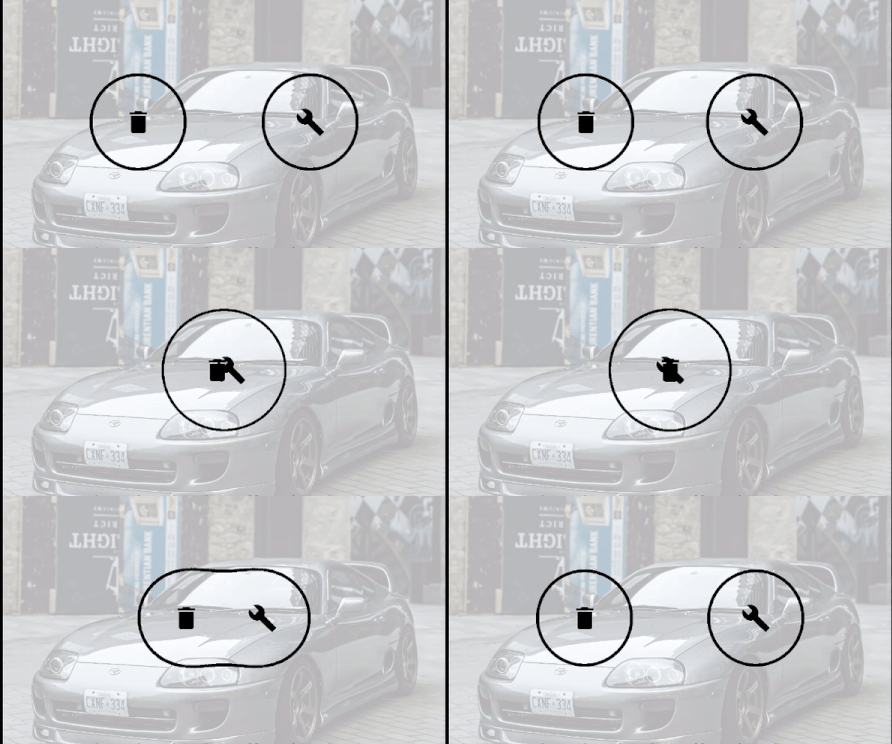
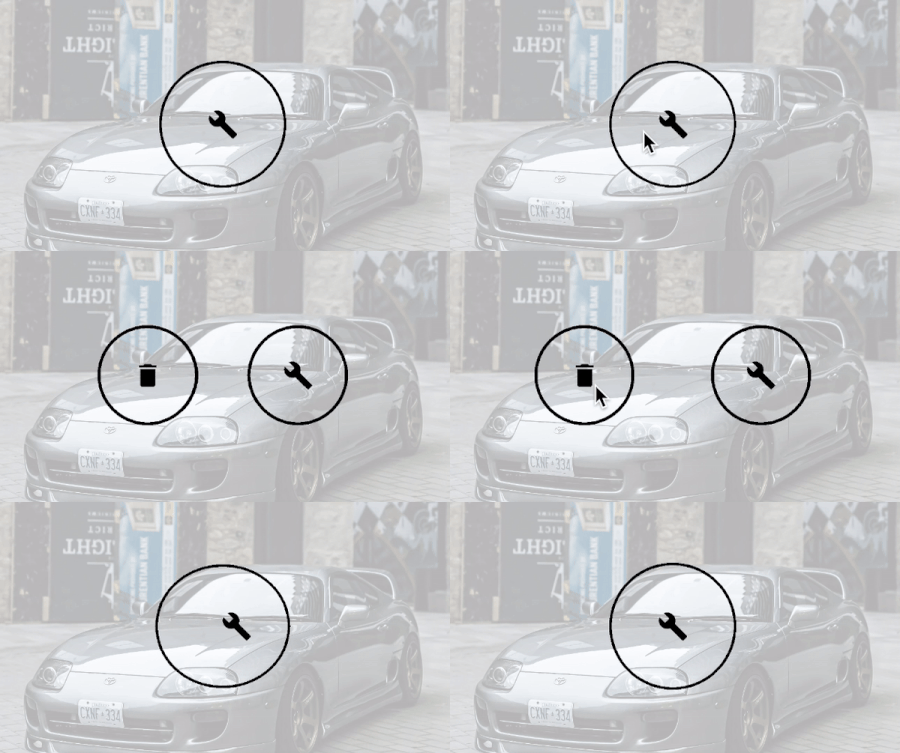
圆形按钮的 Gooey Metaball 特效:

需求:

  • 不透明边框:元球形状应具有特定颜色的不透明边框,例如黑色

  • 透明内背景:元球的内背景应完全透明,以确保整个区域的背景完全不受影响且可见。

  • 可见按钮图标:元球内部的图标必须保持完全不透明,并具有定义的颜色且可见。

  • 处理折叠后的元球:当元球折叠成一个点时,应仅保留最顶部的图标可见,以确保折叠状态下的清晰度。

让我们从第一部分中的第一个AGSL基础示例的代码开始。在这个示例中,我们将AGSL着色器效果应用于父级MetaballBox,并为每个圆形按钮添加了模糊效果:

正如我在创建透明边框metaball背景的概念中所述,为metaball创建边框的思路是在AGSL脚本中使用阈值透明度范围进行过滤。透明度值落在指定范围内的像素将被设置为完全不透明颜色,而所有其他像素则被设置为完全透明,从而形成清晰锐利的边界效果。

这并非本文的主要关注点。然而,由于元球形状内部包含不透明图标,因此会出现一些问题。为了解决这些问题,本文将探讨一些变通方法和技巧,以满足上述要求。

AGSL:颜色测试探究

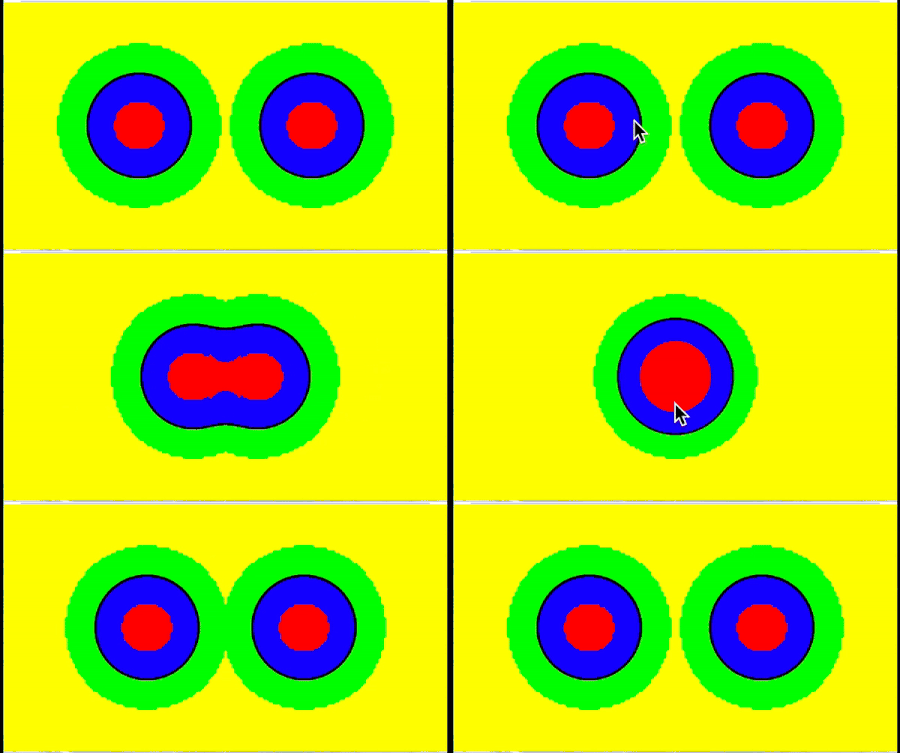
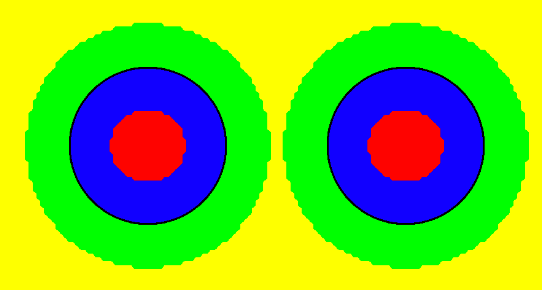
让我们运行测试着色器,并根据每个点的输入alpha值为其分配特定颜色。着色器逻辑应用以下规则:

  • 如果 alpha = 0.0

该点完全透明,为了便于调试,被标记为黄色

  • 如果 alpha < cutoff_min

该点位于元球的内部区域,并被标记为绿色以示区别。

  • 如果 alpha 介于 cutoff_min 和 cutoff_max 之间

该点位于边界区域,并被标记为黑色,以标记过渡区域。

  • 如果 alpha > cutoff_max 但小于 1.0

该点位于外部混合区域,透明度开始逐渐减弱。它被标记为蓝色以表示此范围。

  • 如果 alpha = 1.0

该点完全不透明,并以红色标记其最大不透明度。

1
2
3
4
5
6
7
8
9
10
11
12
13
14
15
16
17
18
19
20
21
22
23
24
25
26
27
28
29
30
31
32
33
34
35
36
37
38
39
40
41
42
43
44
cutoff_min = 0.5f
cutoff_max = 0.6f

@Language("AGSL")
const val ShaderSource_outlined_color_test_1 = """  
    uniform shader composable;

    uniform float cutoff_min; // Minimum cutoff value for transparency  
    uniform float border_thickness; // Thickness of the border  
    uniform float3 rgbColor;  // Custom RGB color (not directly used in this logic)  

    half4 main(float2 fragCoord) {
        half4 color = composable.eval(fragCoord);

        // Calculate cutoff_max dynamically using border_thickness  
        float cutoff_max = cutoff_min + border_thickness;

        // If alpha is exactly 0.0 (fully transparent), set it to yellow  
        if (color.a == 0.0) {
            color.rgb = half3(1.0, 1.0, 0.0); // Yellow for fully transparent  
        }
        // If alpha is below the minimum cutoff, make it green  
        else if (color.a < cutoff_min) {
            color.rgb = half3(0.0, 1.0, 0.0); // Green  
        }
        // If alpha is within the cutoff range (border area), make it black  
        else if (cutoff_min <= color.a && color.a <= cutoff_max) {
            color.rgb = half3(0.0, 0.0, 0.0); // Black  
        }
        // If alpha is above the maximum cutoff but less than fully opaque (outer area), make it blue  
        else if (cutoff_max < color.a && color.a < 1.0) {
            color.rgb = half3(0.0, 0.0, 1.0); // Blue  
        }
        // Fully opaque case where alpha = 1, make it red  
        else {
            color.rgb = half3(1.0, 0.0, 0.0); // Red  
        }

        // Ensure alpha is fully opaque for all cases  
        color.a = 1.0;

        return color;
    }
"""

模糊半径 = 16dp 时的结果(元球大小 = 100dp)

模糊半径 16dp (R = 50dp)

如前所述,本文的重点并非创建边框(黑色区域),而是解决与内部透明部分相关的额外要求,同时保持图标不透明。难点在于如何根据透明度进行过滤,以确定给定点属于图标还是背景。

但在解决这个问题之前,我们先来了解一下为什么在图像内部会看到一个红色圆圈(一个完全不透明的像素)。

假设我们有一个半径为 50 dp 的某种颜色的完全不透明的圆,并应用一个半径很小的模糊效果(1-2 像素),结果会显示这个完全不透明的圆会比原来的 50 dp 半径略小一些。需要强调的是,“完全不透明的圆”指的是圆内所有 alpha 值恰好为 1.0(完全不透明)的点,而 alpha 值小于 1.0(半透明或完全透明)的点则不属于这个圆。模糊半径越大,得到的完全不透明的圆就越小。本质上,模糊效果起到了一种柔化或扩散的作用,从而缩小了模糊圆的尺寸。

如果模糊半径大于不透明圆的半径会发生什么呢?在这种情况下,圆内将不再存在完全不透明的像素,因为模糊会将不透明度完全分散到整个区域,只留下半透明像素。

实际上,要完全模糊一个完全不透明的圆并移除所有不透明像素,我们需要应用一个大于 Metaball 圆形形状的半径/2的模糊半径。

在这种情况下,Metaball 背景将不再包含任何完全不透明的像素。但是,由于图标渲染在一个单独的图层上(参见MetaballBox的实现),该图层未应用模糊效果,因此图标像素的不透明度将保持不变,alpha = 1.0

Metaball 圆形按钮 = 100 dp,因此 R = 50 dp。

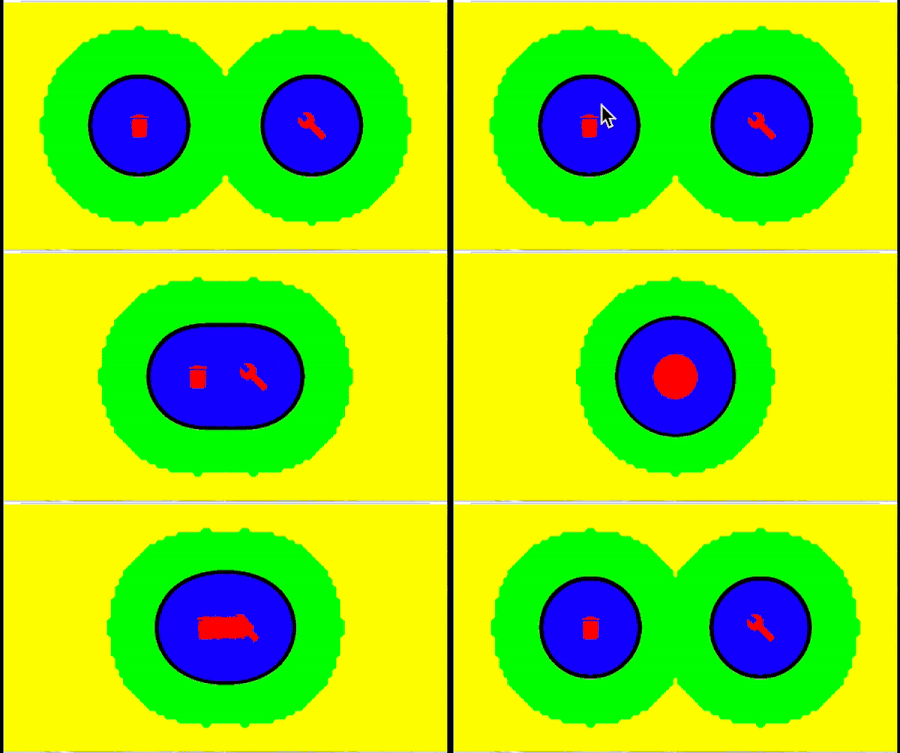
让我们设置一个大于 R/2 + 1 dp = 25 dp 的模糊半径。

对于 25 dp 的模糊半径,仍然会存在一个小的内部不透明点。为了确保不留下任何完全不透明的像素,我们将模糊半径设置为 26.dp

模糊半径 26.dp (R = 50.dp)

越来越接近目标了!在按钮展开状态下,我们可以使用 alpha = 1 来过滤图标。但是,当按钮折叠时,模糊的元球层会产生累积效应,在给定的模糊半径下,最终完全不透明像素的区域会变大。我不确定具体的计算公式,而且这并不特别重要,因为我会在文章后面提出不同的解决方案。现在,我们先采用一个变通方法,进一步增大模糊半径。

应用模糊半径 = 36.dp:

模糊半径 36.dp (R = 50.dp)

简易 AGSL:按 Alpha 值过滤区域

我们来设置输入 RGB 颜色,并将 Alpha 值设为 1,用于红色区域(图标)和黑色区域(边框)。

然后,将透明度(Alpha = 0)应用于所有其他区域。但这里有个小细节:

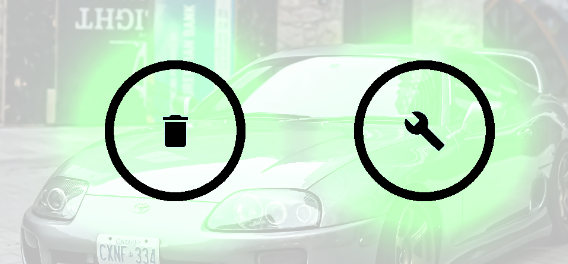
在我的示例中,我使用黑色作为圆形按钮的颜色,但需要注意的是,黑色是“零”色 (0, 0, 0)。如果圆形按钮的背景色是任何非“零”色,例如绿色,那么我们通过将 Alpha 通道设置为 0 来使其完全透明的模糊半透明区域仍然会影响混合效果。这种混合效果的出现是因为颜色分量(RGB)的值不为零,从而导致出现意想不到的视觉效果,例如:

绿色背景圆形按钮示例。

因此,如果我们希望某个像素完全透明,并且背景图层不受影响,不会产生任何副作用,我们不仅应该将 alpha = 0 设置为 0,还应该将 “零”RGB 颜色 设置为黑色 (0, 0, 0)。

之前,我使用的边框粗细为 0.1f。为了使边框更细,我们将其减小到 0.05f

1
2
3
4
5
6
7
8
9
10
11
12
13
14
15
16
17
18
19
20
21
22
23
24
25
26
27
28
29
30
31
32
33
34
35
36
37
38
39
40
41
42
43
44
45
46
47
48
49
@Language("AGSL")
const val ShaderSource_outlined_simple = """  
    uniform shader composable;

    uniform float cutoff_min; // Minimum cutoff value for transparency  
    uniform float border_thickness; // Thickness of the border  
    uniform float3 rgbColor;  // RGB color passed as parameter  

     // Constant for black (zero) RGB color  
    const half3 BLACK_MASK_RGB = half3(0.0, 0.0, 0.0);

    half4 main(float2 fragCoord) {
        half4 color = composable.eval(fragCoord);

        // Calculate cutoff_max dynamically using border_thickness  
        float cutoff_max = cutoff_min + border_thickness;

        // If alpha is exactly 0.0 (fully transparent), do nothing  
        if (color.a == 0.0) {
            // Do nothing  
        }
        // If alpha is below the minimum cutoff,  
        // make it fully transparent and black  
        else if (color.a < cutoff_min) {
            color.rgb = BLACK_MASK_RGB; // Set to black  
            color.a = 0.0; // Fully transparent  
        }
        // If alpha is within the cutoff range (border area),   
        // make it the custom color  
        else if (cutoff_min <= color.a && color.a <= cutoff_max) {
            color.rgb = rgbColor; // Set to custom color  
            color.a = 1.0; // Fully opaque  
        }
        // If alpha is above the maximum cutoff but less than   
        //  fully opaque (outer area), make it fully transparent and black  
        else if (cutoff_max < color.a && color.a < 1.0) {
            color.rgb = BLACK_MASK_RGB; // Set to black  
            color.a = 0.0; // Fully transparent  
        }
        // Fully opaque case where alpha = 1 (Icon area),  
        // make it the custom color  
        else {
            color.rgb = rgbColor; // Set to custom color  
            color.a = 1.0; // Fully opaque  
        }

        return color;
    }
"""

结果:

简单 AGSL:仅按透明度值过滤区域

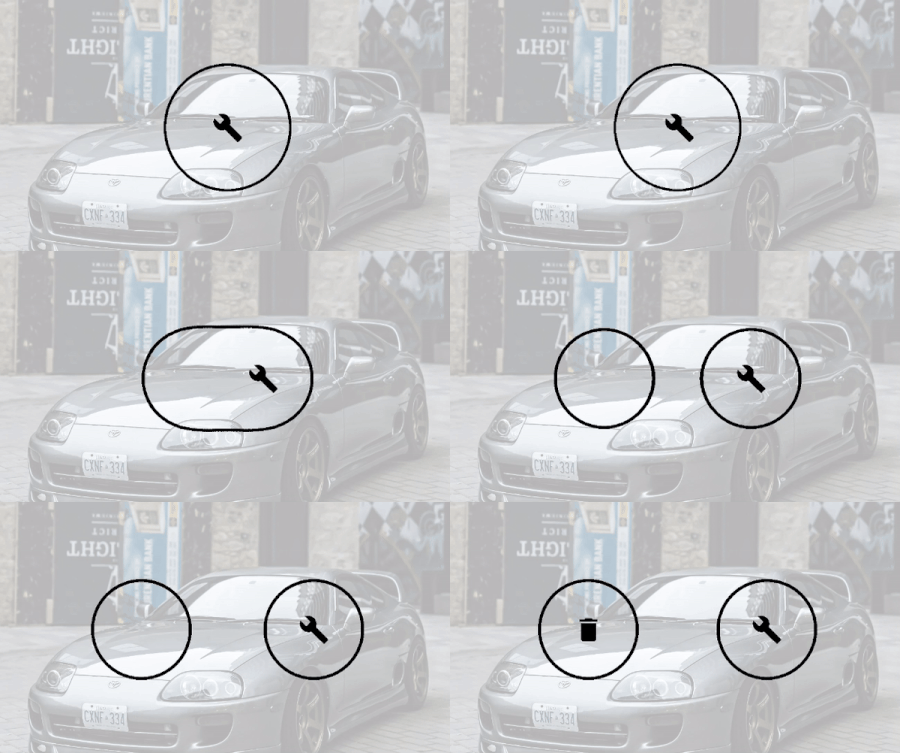
由于内部背景是透明的,我们需要解决图标重叠问题。一个快速的解决方案是隐藏下方按钮的图标,同时保持上方按钮的图标可见。

我们可以跟踪按钮的偏移量,当偏移量小于20dp时,将下方图标的可见性状态设置为false。相反,当偏移量大于20dp时,将其设置为true

为了优化,将此逻辑封装在 **derivedStateOf** 中。此外,将按钮图标封装在 **AnimatedVisibility** 中。或者,你可以尝试根据按钮之间的偏移量手动更改 alpha 色调。

但是,如果我们希望图标的可见性过渡平滑,这种方法就行不通了。在下面的代码片段中,我将展开动画的持续时间设置为 7 秒,将隐藏动画的持续时间设置为 4 秒。但由于 AGSL 会根据 alpha 值进行过滤,一旦图标的 alpha 值逐渐低于 1,它就会立即完全透明。在展开动画期间,图标不会逐渐淡入——它会一直保持不可见,直到 4 秒动画结束。此时,当 AnimatedVisibility 容器将其 alpha 值设置为完全不透明(alpha = 1)时,图标会立即弹出。

1
2
3
4
5
6
7
8
9
10
11
12
13
14
15
16
17
18
19
20
21
22
23
24
25
26
27
28
29
30
31
32
33
34
35
36
37
38
39
40
41
42
43
44
45
46
47
48
49
50
51
52
53
54
55
56
57
58
59
60
61
62
63
64
65
66
67
68
69
70
71
72
73
74
75
76
77
78
79
80
81
82
83
84
@Composable
fun ExampleAGSLOutlineContent(
    modifier: Modifier = Modifier
) {
        var isExpanded by remember { mutableStateOf(false) }
        val offsetDistance = (80).dp
        val buttonOffset by animateDpAsState(
            targetValue = if (isExpanded) offsetDistance else 0.dp,
            animationSpec = tween(durationMillis = 7000)
        )

        val color = Color.Black

        //test visibility start  
        var isVisible by remember { mutableStateOf(false) } // Another state for visibility  
        // Derived state to update visibility based on buttonOffset  
        val derivedVisibility = remember(buttonOffset) {
            derivedStateOf { buttonOffset > 40.dp }
        }


        // Observe derived state and update visibility  
        LaunchedEffect(derivedVisibility.value) {
            isVisible = derivedVisibility.value
        }

//

val blurRadius = 16.dp
//

val blurRadius = 26.dp
        val blurRadius = 36.dp


        OutlineShaderMetaballBox(
            modifier = modifier,
            color = color
        ) {

            Box(
                contentAlignment = Alignment.Center,
                modifier = Modifier
                    .fillMaxWidth()
                    .padding(vertical = 24.dp)
            ) {

                BlurCircularButton(
                    Modifier.offset { IntOffset(x = -buttonOffset.roundToPx(), y = 0) },
                    onClick = { isExpanded = !isExpanded },
                    color = color,
                    blur = blurRadius,
                ) {

                    AnimatedVisibility(
                        visible = isVisible,
                        enter = fadeIn(animationSpec = tween(durationMillis = 4000)),
                        exit = fadeOut(animationSpec = tween(durationMillis = 4000)),
                    ) {
                        Icon(
                            modifier = Modifier.size(28.dp),
                            imageVector = Icons.Filled.Delete,
                            contentDescription = null,
                            tint = color,
                        )
                    }
                }
                BlurCircularButton(
                    Modifier
                        .offset { IntOffset(x = +buttonOffset.roundToPx(), y = 0) },
                    onClick = { isExpanded = !isExpanded },
                    color = color,
                    blur = blurRadius,
                ) {
                    Icon(
                        modifier = Modifier.size(28.dp),
                        imageVector = Icons.Filled.Build,
                        contentDescription = null,
                        tint = color,
                    )
                }
            }
        }
}

图标可见性过渡闪烁不流畅:

AGSL Alpha 通道过滤破坏了动画可见性过渡

对于快速展开/折叠动画和可见性过渡的持续时间,例如 150 毫秒300 毫秒,此问题可能不明显,并且可以正常工作。

  • 实现简单:AGSL 脚本非常简单,仅依赖于输入像素颜色的 Alpha 通道进行过滤。

  • 对最小模糊半径有严格的依赖性。合并的元素越多,就越难计算或通过实验确定稳定实现所需的最小可接受模糊半径。这使得该方法不可靠,不适合实现健壮稳定的效果。

  • 由于 AGSL 脚本中基于 alpha 通道的滤波特性,图标的平滑出现和消失难以实现。

  • 随着元球交互中涉及的元素数量增加,以及膨胀物理机制的复杂性提升,确定和实现图标出现或消失的精确时机变得困难,进一步增加了控制的复杂性和整体逻辑的复杂性。

让我们寻找更好的解决方案:

中级 AGSL:按 Alpha 值和标记颜色过滤区域

让我们再次回到较小的模糊半径 16dp。

Alpha = 1 的红色区域

我们需要检测红色不透明区域中的像素是否属于图标。

我建议使用一个额外的 RGB 颜色作为标记。唯一的要求是,对于应用 AGSL 效果的容器及其子元素,该颜色必须是唯一的。

为 AGSL 着色器添加一个浮点型参数 markerColor。

我们使用青色 RGB作为标记颜色。使用 Color.Cyan 为图标着色,并将相同的青色作为参数传递给 AGSL 脚本。

在 AGSL 中定义以下参数:

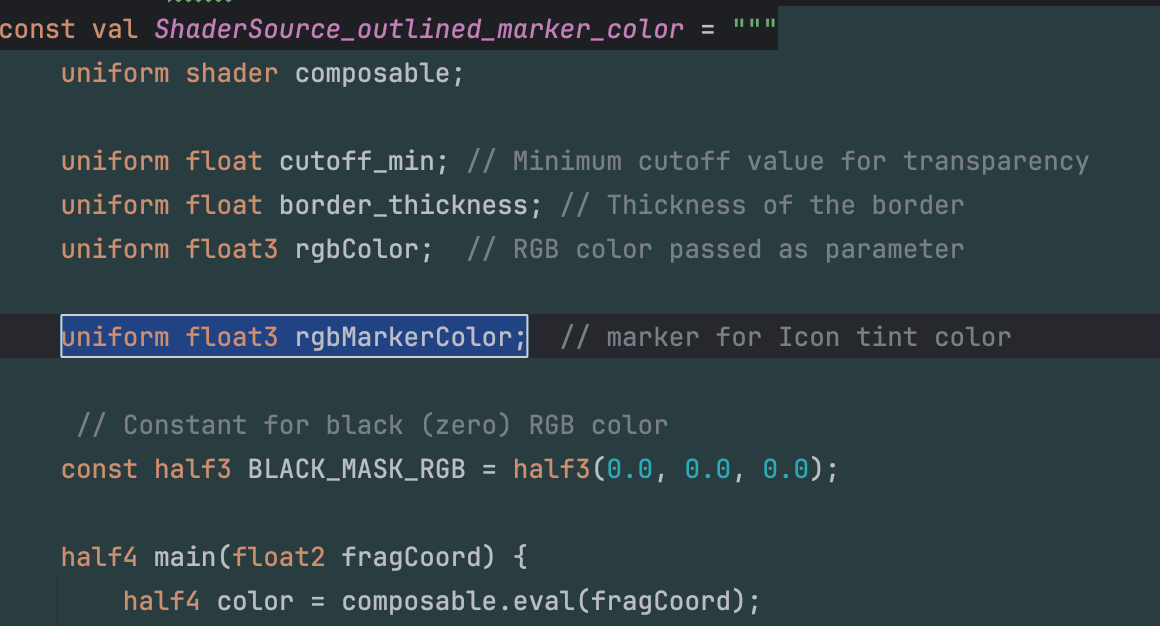
添加新参数:rgbMarkerColor,类型为 uniform float3

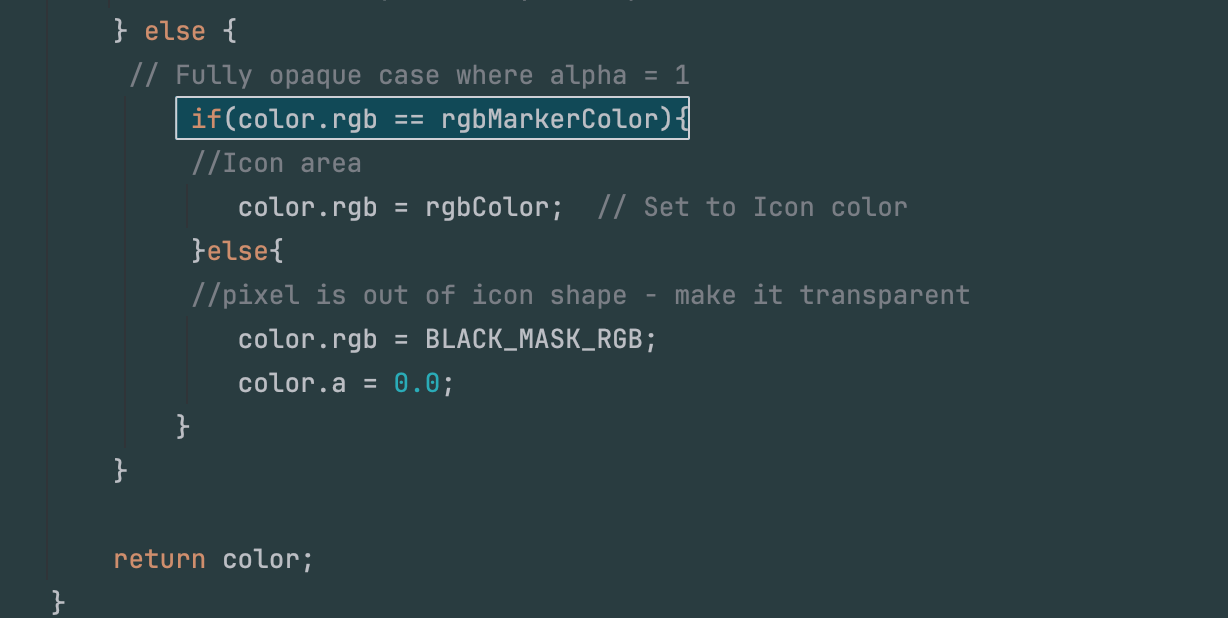
AGSL 着色器源代码的结构与上一章相同,唯一的区别在于最后一个 else 代码块,其中 alpha 值为 1,代表测试屏幕上的中心红色。

在不透明部分,检查像素的 RGB 颜色是否等于 markerColor。如果为真,则它是图标像素——你可以将其着色为任何你想要的颜色。设置 alpha = 1 是多余的,因为我们已经在不透明的 else 语句块中了。

否则,如果为假,则它肯定不是图标像素——通过将 RGB 值设置为黑色并将 alpha = 0 设置为 0 使其完全透明。

使用标记颜色检测像素是否属于图标

完整的 AGSL 脚本:

1
2
3
4
5
6
7
8
9
10
11
12
13
14
15
16
17
18
19
20
21
22
23
24
25
26
27
28
29
30
31
32
33
34
35
36
37
38
39
40
41
42
43
44
45
46
47
48
49
50
51
52
53
54
55
@Language("AGSL")
const val ShaderSource_outlined_marker_color = """  
    uniform shader composable;

    uniform float cutoff_min; // Minimum cutoff value for transparency  
    uniform float border_thickness; // Thickness of the border  
    uniform float3 rgbColor;  // RGB color passed as parameter  

    uniform float3 rgbMarkerColor;  // marker for Icon tint color  

     // Constant for black (zero) RGB color  
    const half3 BLACK_MASK_RGB = half3(0.0, 0.0, 0.0);

    half4 main(float2 fragCoord) {
        half4 color = composable.eval(fragCoord);

        // Calculate cutoff_max dynamically using border_thickness  
        float cutoff_max = cutoff_min + border_thickness;

        // If alpha is exactly 0.0 (fully transparent), do nothing  
        if (color.a == 0.0) {
            // Do nothing  
        }
        // If alpha is below the minimum cutoff,  
        // make it fully transparent and black  
        else if (color.a < cutoff_min) {
            color.rgb = BLACK_MASK_RGB; // Set to black  
            color.a = 0.0; // Fully transparent  
        }
        // If alpha is within the cutoff range (border area),   
        // make it the custom color  
        else if (cutoff_min <= color.a && color.a <= cutoff_max) {
            color.rgb = rgbColor; // Set to custom color  
            color.a = 1.0; // Fully opaque  
        }
        // If alpha is above the maximum cutoff but less than   
        //  fully opaque (outer area), make it fully transparent and black  
        else if (cutoff_max < color.a && color.a < 1.0) {
            color.rgb = BLACK_MASK_RGB; // Set to black  
            color.a = 0.0; // Fully transparent  
        } else {
         // Fully opaque case where alpha = 1  
             if(color.rgb == rgbMarkerColor){
             //Icon area  
                color.rgb = rgbColor;  // Set to Icon color  
             }else{
             //pixel is out of icon shape - make it transparent  
                color.rgb = BLACK_MASK_RGB;
                color.a = 0.0;
            }
        }

        return color;
    }
"""

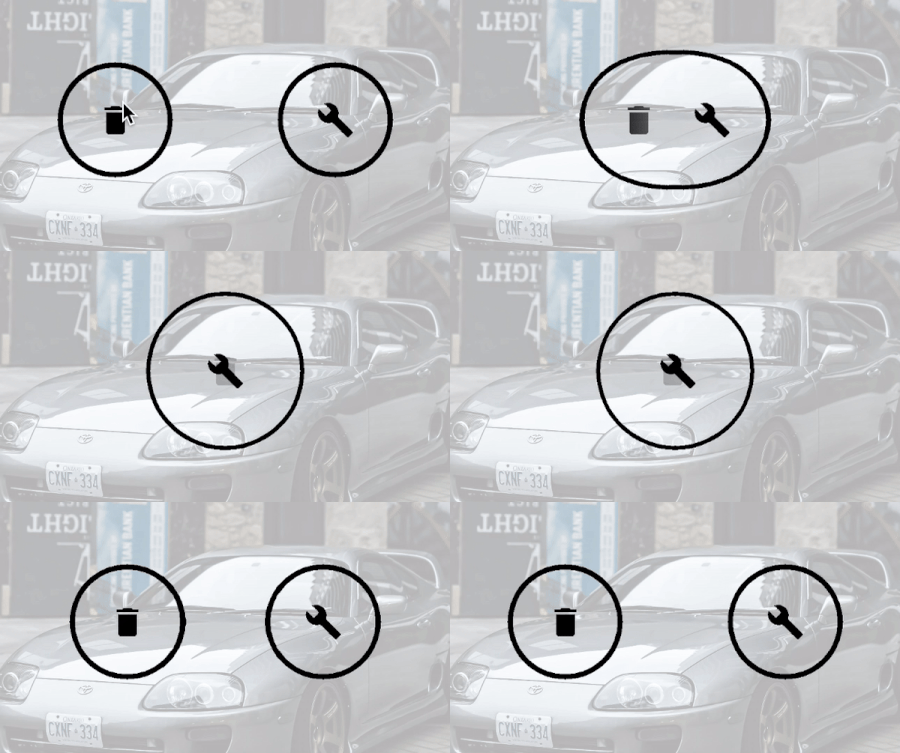
以下是三种情况的解决方案示例:

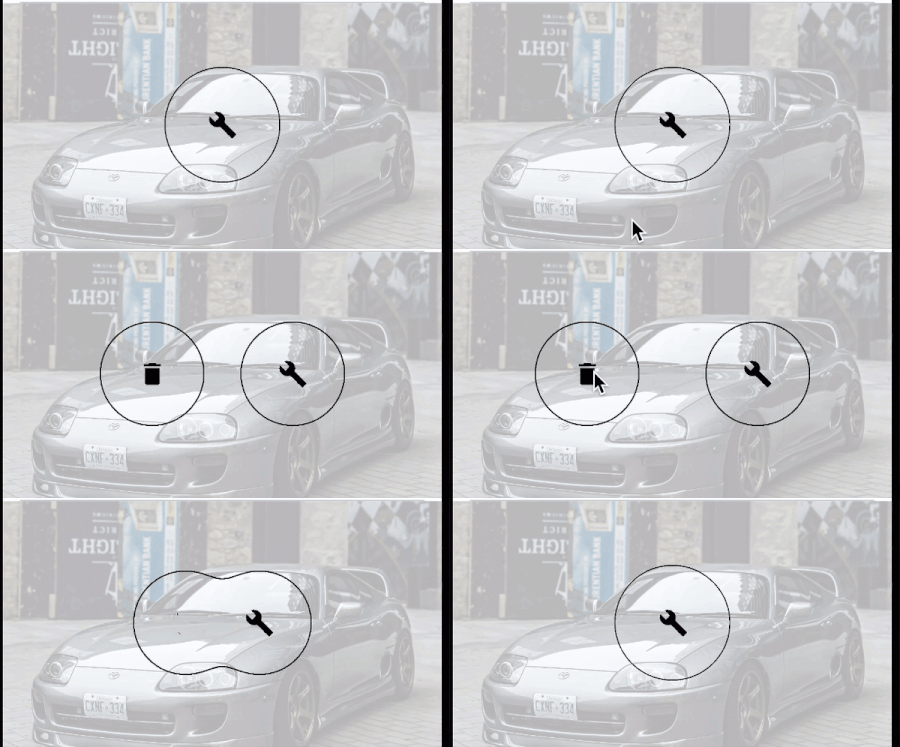
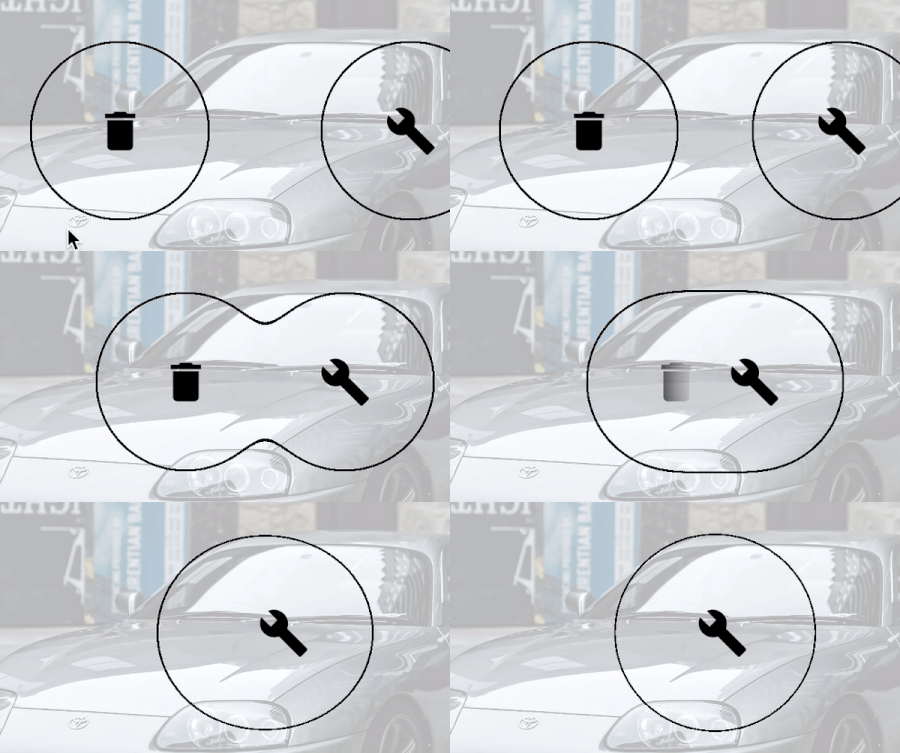
  • 当图标中心部分在折叠和展开状态下均存在不透明边框时(blurRadius = 16dp)。

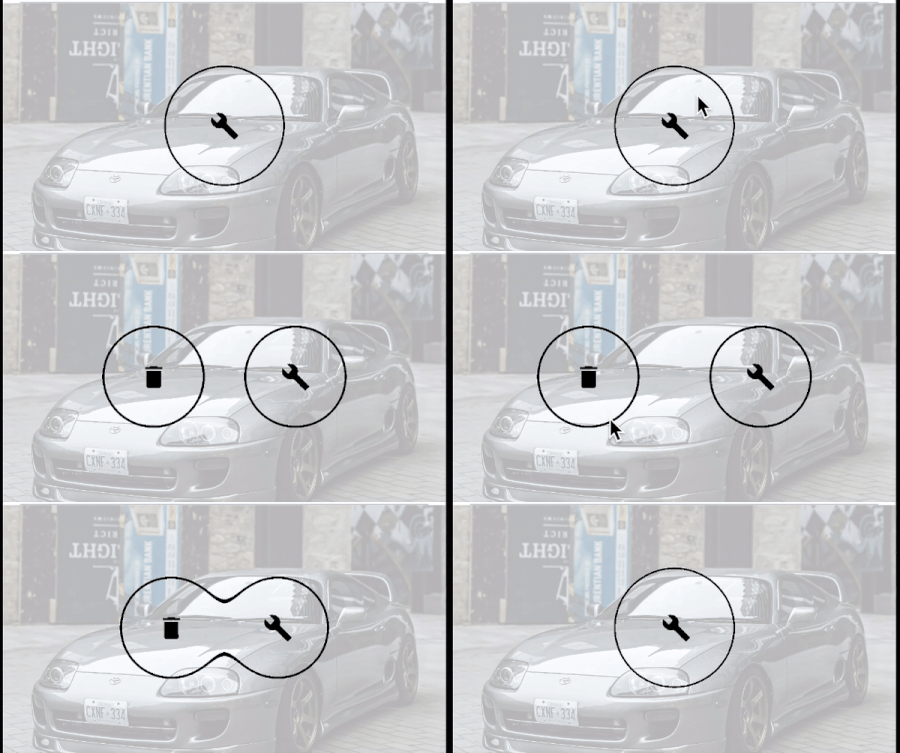
  • 当图标在展开状态下仅形状不透明,但在折叠状态下仍然存在不透明边框时(blurRadius = 26dp)。

  • 当模糊半径足够大,以至于在展开和折叠状态下均不存在不透明边框时(blurRadius = 36dp)。

blurRadius 16.dp

blurRadius 26.dp

blurRadius 26.dp

请注意,尽管所有示例均使用 borderAlphaThickness = 0.05f 执行,但增加 blurRadius 的值也会增加边框的粗细。

  • AGSL 的实现相对简单,满足文章开头概述的要求。

  • 重叠部分会自动处理,因此折叠时无需手动隐藏底层图标。

  • 应该也能处理更多数量的元球。

  • 可以很好地适应不同的模糊半径。

  • 如果传递了额外的标记颜色参数但未正确设置为色调颜色,则该参数可能会成为潜在的错误来源。

  • 必须确保标记颜色具有唯一的 RGB 值,并且与用于模糊效果的颜色不同。

  • 消失的重叠图标就像一个不可见的透明图层。虽然这对于 Material 3(更抽象)来说没有问题,但对于 Material Design 2 的老用户来说,这可能会破坏设计理念。

高级 AGSL:按 Alpha 值、标记颜色和计算亮度过滤区域。

上一章的解决方案,持续时间更长,并略微放大:

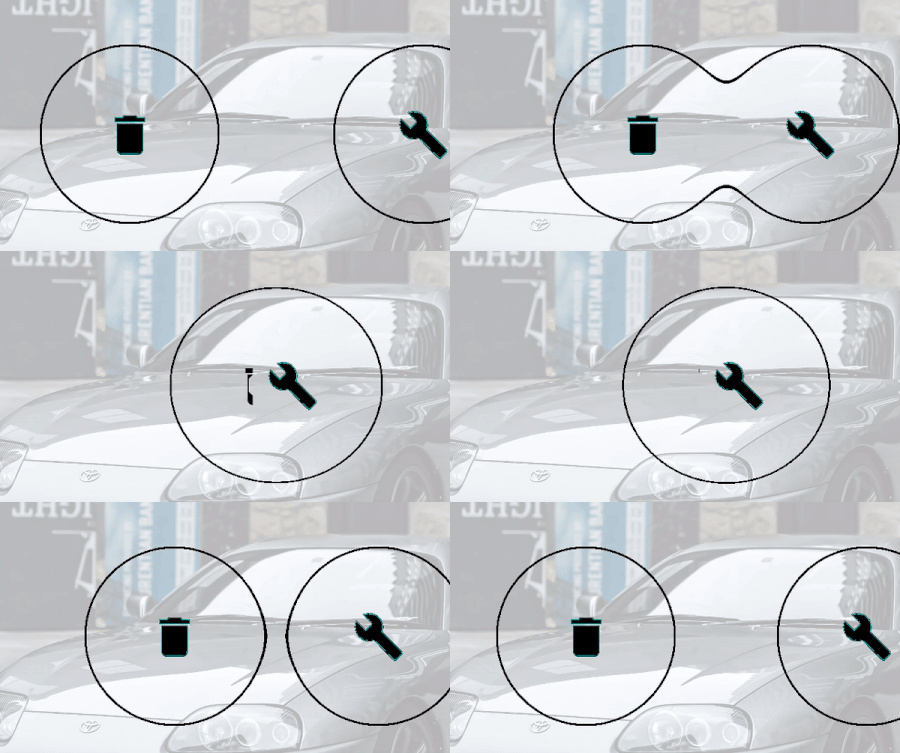
图标突然消失(不平滑)

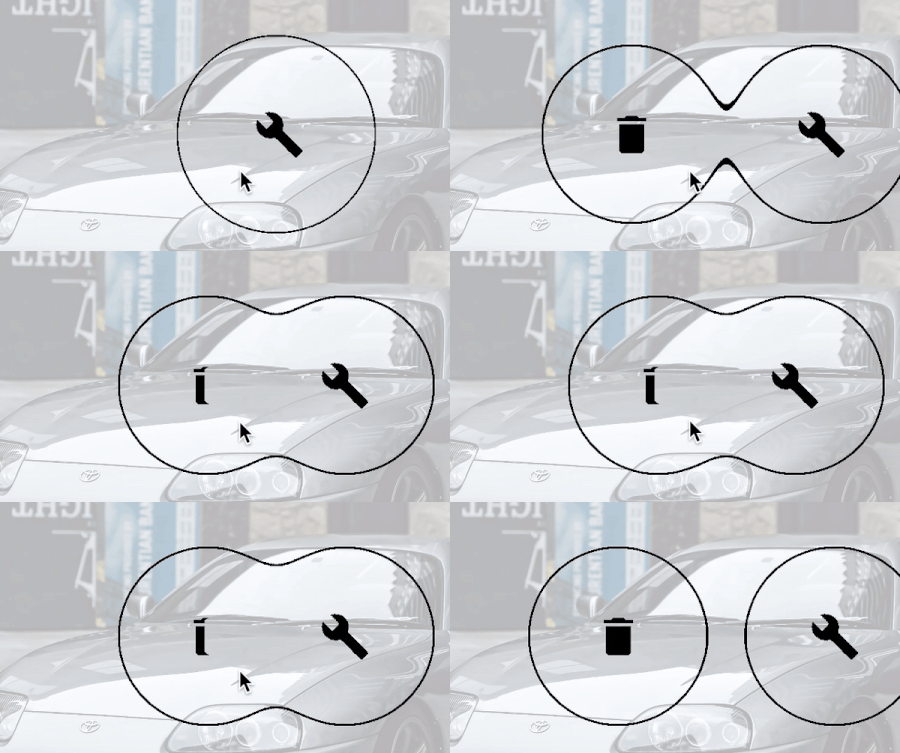
左侧图标在清晰的、不可见的边框下方突然消失。我们通过使其在接近边框时平滑淡出,并在折叠状态下完全消失来修复此问题。

基于上一章中 else 语句(本例中为 alpha = 1)检查是否与 colorMarker 值相等,我将进行修改,增加一项检查是否与黑色 RGB 值相等的检查,并将 else 语句留空:

展开/折叠过程中,左侧图标被模糊区域覆盖

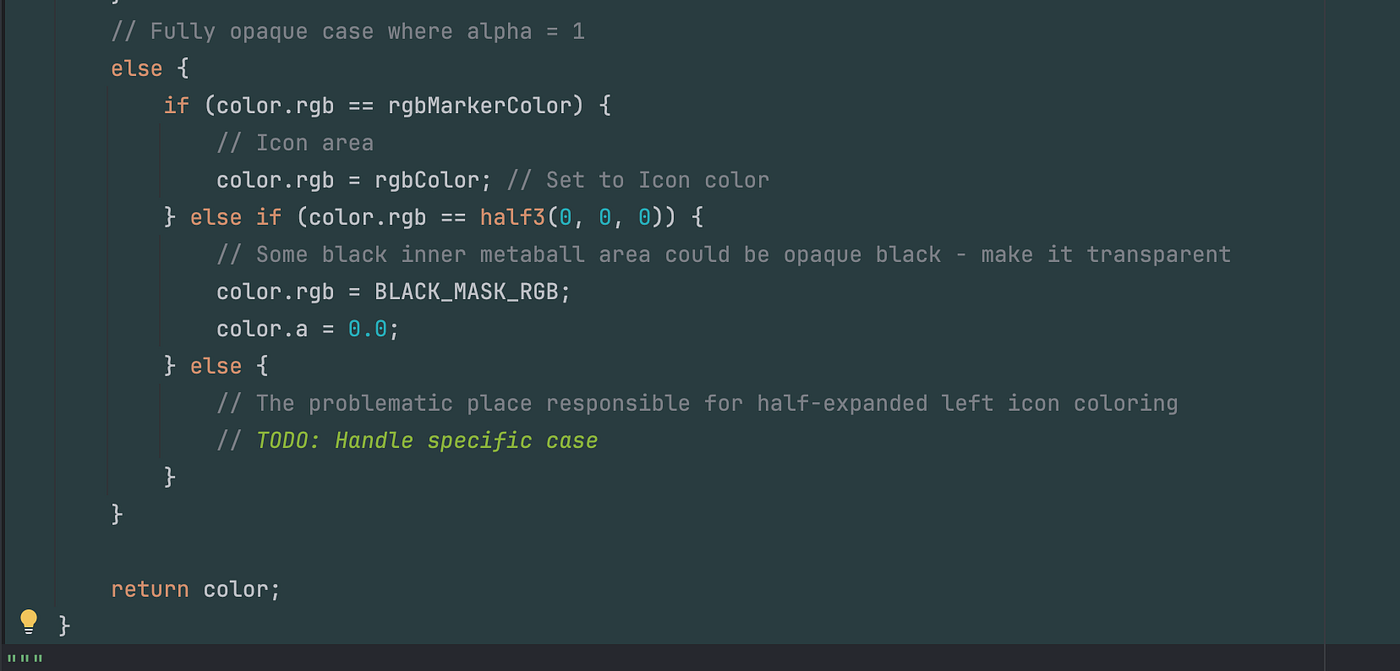
在折叠过程中,我们看到左侧(后方)图标的颜色接近 rgbMarkerColor(Color.CYAN),该图标部分被顶部的元球形状覆盖。然而,情况略有不同,因此条件 color.rgb == rgbMarkerColor 不匹配。随着图标逐渐靠近,这种“接近标记颜色”的颜色会逐渐过渡到接近黑色(即用于模糊效果的元球圆形按钮背景色)。

颜色并非完全是青色的原因在于混合效果。当左侧图标被右侧元球的模糊图层覆盖时,标记颜色会发生扭曲。根据标记颜色上方黑色模糊层的透明度,我们看到的颜色要么非常接近标记颜色,要么更接近黑色。

从视频中,我们可以观察到颜色之间的平滑过渡。

为了最大程度地增强亮度变化的效果,我们使用亮度最高的 MarkerColor——纯白色 (1, 1, 1)。最终颜色由用于模糊效果的圆形按钮背景色决定,在本例中为黑色——这非常适合接下来的解决方案。

**MarkerColor** 更改为白色:**

从接近白色的不透明过渡到接近黑色的不透明。

在最终的 GIF 动画中,当 markerColor = (1, 1, 1)(白色)时,我们可以看到,左侧图标在与右侧元球重叠并逐渐靠近的过程中,其 RGB 值从接近白色的完全不透明过渡到接近黑色的完全不透明。

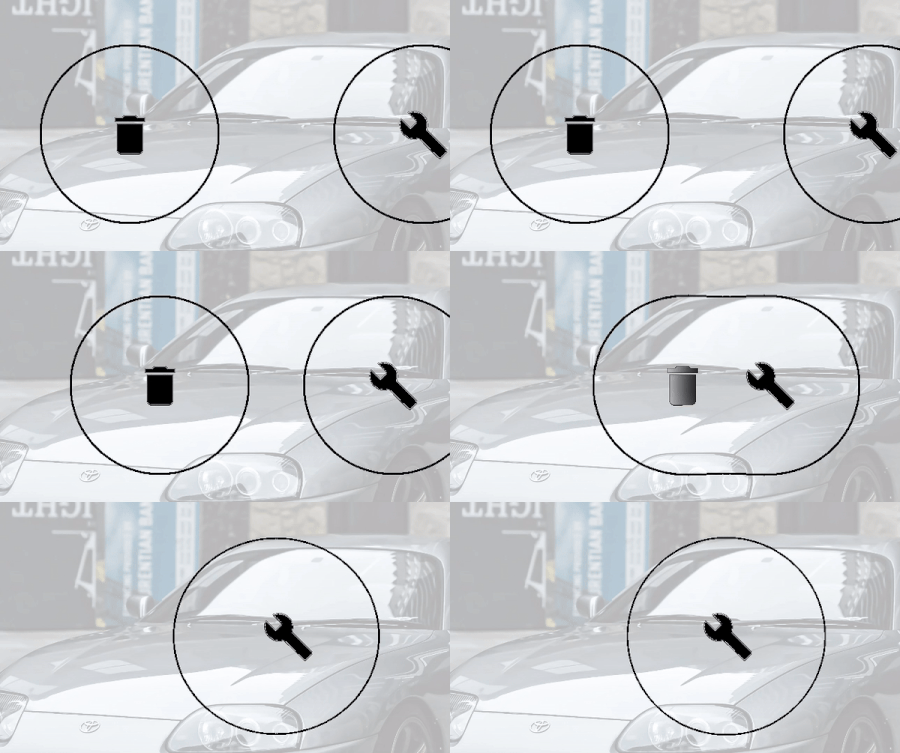
本章的解决方案是利用亮度从亮到暗的变化,并将这些变化转换​​为透明度从不透明到透明的变化。

使用亮度作为 Alpha 通道

亮度作为 Alpha 通道(模糊半径 16dp)

当模糊半径非常小时,元球中心呈现不透明的圆形(我在第一章“AGSL:颜色测试探究”中提到的区域),这种方法效果很好(半径为 16dp)。但是,当使用较大的半径时,在折叠状态下,只有属于图标的不透明像素没有边框,此时会出现 UI 问题。

让我们用大于 36dp 的模糊值来测试一下:

亮度作为 alpha 通道(模糊半径 45dp)

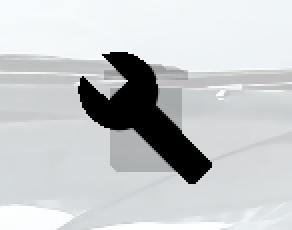
问题:底层垃圾桶图标可见。

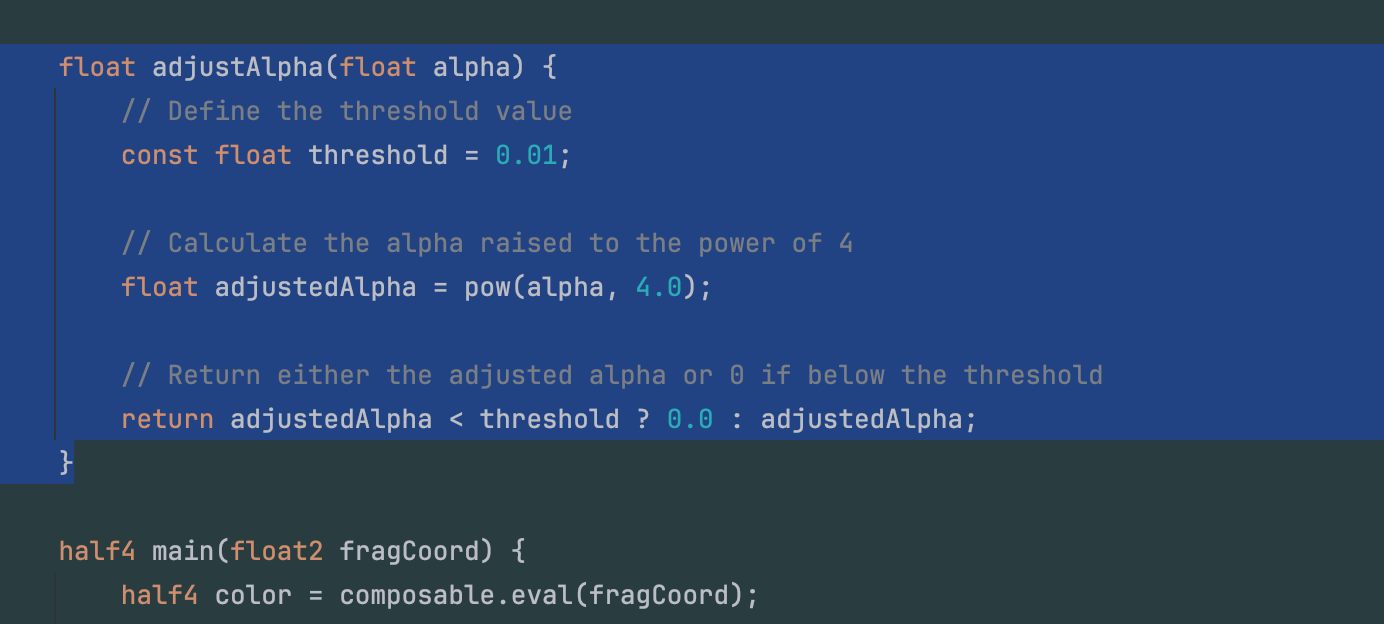
让我们创建一个名为 adjustAlpha 的辅助函数来动态调整 alpha 通道。该函数以当前的 alpha 值作为输入,并执行两个关键操作:

  1. 指数运算:将 alpha 值提升到 4 次方。此操作通过增强较高的 alpha 值并更快地降低较小的 alpha 值,来帮助平滑过渡。

  2. 阈值处理:指数运算后,函数会检查调整后的 alpha 值是否小于预定义的阈值(例如 0.01)。如果小于,则返回 0.0(完全透明);否则,返回调整后的 alpha 值。

这种操作组合确保即使是较小的 alpha 值也能平滑过渡到完全透明,而不会出现突兀的视觉瑕疵。

调整 alpha 值

通过使用此辅助函数,我可以轻松地平滑处理 alpha 过渡。

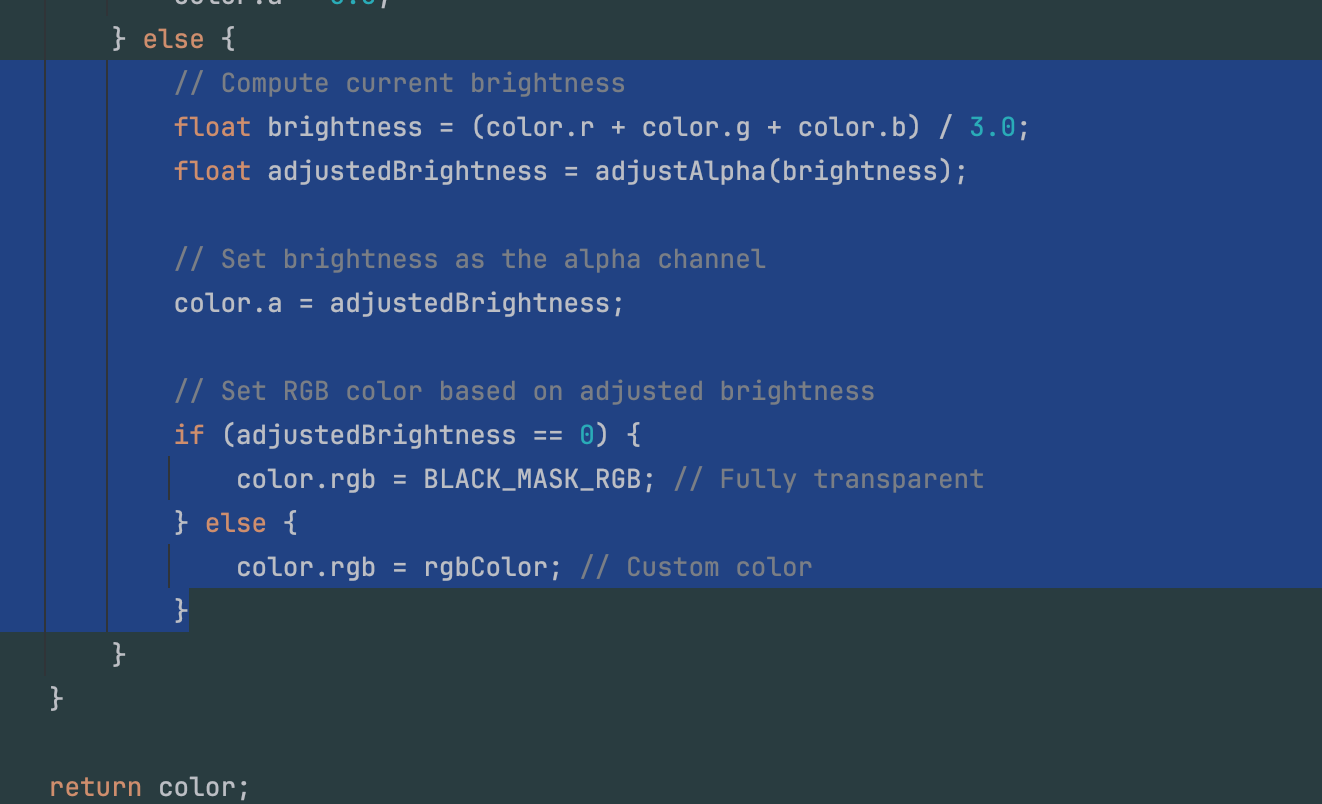
此外,当调整后的透明度为 0 时,我们将 RGB 值设置为遮罩颜色(例如黑色)。如果不是 0,则函数会赋值 rgbColor。在当前示例中,rgbColor 也为黑色,但如果我们使用不同的颜色进行模糊处理,此逻辑可确保正确处理透明度。

ajustAlpha() 辅助函数的使用。

最终解决方案。模糊半径 36dp

完整的 AGSL 脚本:

1
2
3
4
5
6
7
8
9
10
11
12
13
14
15
16
17
18
19
20
21
22
23
24
25
26
27
28
29
30
31
32
33
34
35
36
37
38
39
40
41
42
43
44
45
46
47
48
49
50
51
52
53
54
55
56
57
58
59
60
61
62
63
64
65
66
67
68
69
70
71
72
73
74
75
76
77
78
79
@Language("AGSL")
const val ShaderSource_outlined_marker_color_and_marker_brightness = """  
    uniform shader composable;

    uniform float cutoff_min; // Minimum cutoff value for transparency  
    uniform float border_thickness; // Thickness of the border  
    uniform float3 rgbColor;  // RGB color passed as a parameter  
    uniform float3 rgbMarkerColor;  // Marker for Icon tint color  

    // Constant for black (zero) RGB color  
    const half3 BLACK_MASK_RGB = half3(0.0, 0.0, 0.0);

    // Helper function to adjust alpha dynamically  
    float adjustAlpha(float alpha) {
        // Define the threshold value  
        const float threshold = 0.01;

        // Calculate the alpha raised to the power of 4  
        float adjustedAlpha = pow(alpha, 4.0);

        // Return either the adjusted alpha or 0 if below the threshold  
        return adjustedAlpha < threshold ? 0.0 : adjustedAlpha;
    }

    half4 main(float2 fragCoord) {
        half4 color = composable.eval(fragCoord);

        // Calculate cutoff_max dynamically using border_thickness  
        float cutoff_max = cutoff_min + border_thickness;

        // If alpha is exactly 0.0 (fully transparent), do nothing  
        if (color.a == 0.0) {
            // Do nothing  
        }
        // If alpha is below the minimum cutoff, make it fully transparent and black  
        else if (color.a < cutoff_min) {
            color.rgb = BLACK_MASK_RGB; // Set to black  
            color.a = 0.0; // Fully transparent  
        }
        // If alpha is within the cutoff range (border area), make it the custom color  
        else if (cutoff_min <= color.a && color.a <= cutoff_max) {
            color.rgb = rgbColor; // Set to custom color  
            color.a = 1.0; // Fully opaque  
        }
        // If alpha is above the maximum cutoff but less than fully opaque (outer area),  
        // make it fully transparent and black  
        else if (cutoff_max < color.a && color.a < 1.0) {
            color.rgb = BLACK_MASK_RGB; // Set to black  
            color.a = 0.0; // Fully transparent  
        }
        // Fully opaque case where alpha = 1  
        else {
            if (color.rgb == rgbMarkerColor) {
                // Icon area  
                color.rgb = rgbColor; // Set to Icon color  
            } else if (color.rgb == rgbColor) {
                // Some black inner metaball area could be opaque - make it transparent  
                color.rgb = BLACK_MASK_RGB;
                color.a = 0.0;
            } else {
                // Compute current brightness  
                float brightness = (color.r + color.g + color.b) / 3.0;
                float adjustedBrightness = adjustAlpha(brightness);

                // Set brightness as the alpha channel  
                color.a = adjustedBrightness;

                // Set RGB color based on adjusted brightness  
                if (adjustedBrightness == 0) {
                    color.rgb = BLACK_MASK_RGB; // Fully transparent  
                } else {
                    color.rgb = rgbColor; // Custom color  
                }
            }
        }

        return color;
    }
"""
  • 效果极佳。符合 UI 要求,确保当元球按钮靠近时,图标平滑消失。

  • 复杂逻辑:此实现引入了更多复杂性,尤其是在处理亮度到透明度的计算方面,这可能会增加出现错误的可能性。

  • 模糊半径限制:非常大的模糊半径值需要通过亮度(AGSL:adjustAlpha())微调透明度计算,以保持预期行为。

  • 可扩展性问题:当处理两个以上的元球元素时,可能需要对透明度计算函数进行额外调整。

  • 标记和模糊颜色限制:标记颜色必须为纯白色,而模糊颜色必须为纯黑色,以避免混合不一致。

  • 设计依赖性:所有必需的颜色,包括图标颜色、边框颜色和内部区域的透明度,都必须通过 AGSL 着色器显式设置,这增加了对着色器逻辑的依赖性。

当前可组合部分的 GitHub 链接 以及 AGSL 着色器链接

Comments